
Take control of your life
and your time
Sirius Focus is a personal planner. Categories help you decide who you want to become in each part of your life. Every project, goal and action traces back to that, so you can trust you're moving in the direction you chose.
Sirius Focus guides you to discover what you really want in life and gives you the tools to take the right actions to get there.
Free for everyone, in your browser and on your phone.
How it works
Decide where you're going, then do the work and learn from it
-
Design
Give each part of your life a Vision, and each project a Result and a Purpose.
-
Capture
Anything new goes into the Inbox in seconds.
-
Do
Star the few actions that matter and move them across today's Board.
-
Reflect
Note what you learned in the Logbook, and say why when you skip something.
-
Review
Each week, a guided review asks what you learned, what you avoided and what to stop, then has you design next week category by category.
Built on ideas from Getting Things Done, Atomic Habits, The 80/20 Principle and Building a Second Brain. Where each one comes from .
Categories
Give each part of your life a vision, and each project a purpose
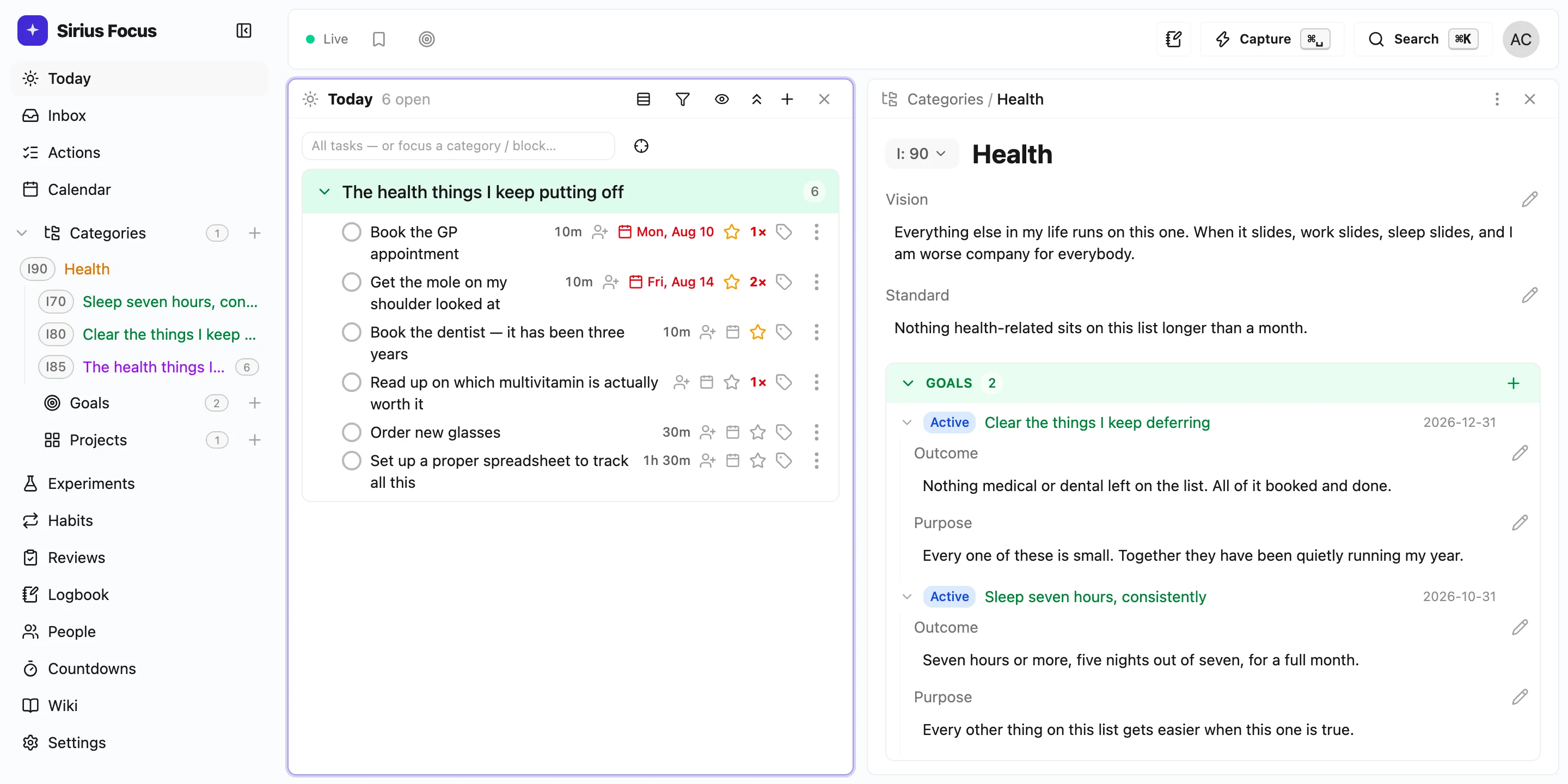
Open a category such as Health and write its Vision: who you are when this part of your life is going well. Add a Standard, the thing you no longer accept from yourself. Every project under it starts the same way, with the Result you want and the Purpose behind it, before you write a single action.
So the question stops being "what should I do?" and becomes "what would the person in this Vision do this week?" An action that leads back to nothing you care about is easy to drop, and across your categories you can see which parts of your life you've stopped giving time to.
- Category
- Health
- Vision
- I have the energy to play with my kids after work
- Standard
- I don't trade sleep for one more hour of work
- Project
- Sleep reset
- Result
- in bed by 22:30 five nights a week for a month
- Purpose
- every bad week this year started with a bad night
- Actions
-
- shut down digital devices by 9pm
- do 15 minutes meditation before sleep
- journal for 10 minutes reflecting on the past day and gratitude
Now shutting down your devices by 9pm is a step towards somebody you want to be.
None of this is required. Actions work perfectly well on their own.
Goals
Set goals so you know what you're aiming for
Define a goal by its Outcome, what done looks like, and its Purpose, why it's a must for you. Add a Strategy and a target date, then attach it to the category it serves, such as Health, and link the projects that will get you there. Mark it Achieved, Paused or Dropped when that changes, so your goals stay a true picture of what you're going for.
Execute
Plan in depth and work at speed
Sirius Focus is designed so the planning never gets in the way of the doing. Two things do most of the work.
- Board
- Set the actions list to the board layout and every action sits in a lane: Backlog, Planned, In progress, Waiting and Done. Drag a card across as the work moves; drop it in Done and it's done.
- Command palette
- Press ⌘K to jump to any category, goal or project, create a new one, or start a review, without touching the mouse. Every list works from the keyboard.
If a system is slow to use, you stop using it.
Reflect
See how the plan is going, and change it
Whatever you designed above is a first guess. These five show you what actually happened, in your own words, so you change the plan instead of just trying harder.
Inbox
Dump anything new into the inbox and decide later
Anything that comes up goes into the inbox in a couple of seconds, without deciding what it is yet. When you review, you turn each item into an action, file it under a project, or throw it away, so the thing that arrived on Tuesday doesn't get to run your Tuesday.
Nothing has to leave the inbox. An action can sit there indefinitely and never belong to a project, a goal or a category.
Logbook
Keep a logbook of what you learn as you go
Write down a thought, a reflection or an idea while it's fresh, and tag what happened: learned, worked, failed. By Sunday you have a record of the days to review, rather than a column of ticks and a feeling about them.
Experiments
Track the changes you're trying, and whether they work
Write down a change you want to make in your life, such as "no phone in the bedroom", and link it to the goal it serves. As the weeks go by, add evidence for or against it in a line or two. The weekly review asks which changes to keep and which to drop, so you find out what works for you instead of guessing.
Skips
Capture why you skipped something
Skip an action and you write one line saying why, in a couple of seconds. On its own, every reason is a good one. Nine of them against the same action, in your own words, tell you something about the plan: maybe the action is too big, maybe it doesn't belong there at all.
It never tells you you're avoiding something. It shows you that you moved the same action four times and wrote "don't know where to start" every time.
You say the rest. Sometimes the action matters more than everything else on your list. Sometimes it should never have been on it. The app doesn't decide which. It just makes sure you see the record.
Reviews
Review the day and the week with guided questions
Open a review each morning, each evening and once a week, and answer questions instead of facing a blank page. The weekly one asks what you learned, what you avoided, which experiments to keep and what to stop doing. It ends with designing next week, category by category: the Result, the Purpose, then the plan.
Everything above is the real app, running in this page. Sign up with an email and it's yours.
Create your accountHabits
Track the habits that keep going
Add a habit such as a morning walk and mark it each day in one tap. Miss one and you can say what got in the way, or freeze the day when you genuinely couldn't, so a week away doesn't read as a collapse when you look back.
The point
What changed for me
Before
I used to end the week tired. I had been busy, and I wasn't sure it mattered. The thing I cared about hadn't moved in a month and I couldn't say why, because none of it was written down.
After
Now I end the week knowing which parts of my life got my time, what I learned, and what I'm designing for next week.
It's about choosing who you become, one week at a time.
Start small
Start with the inbox and the board
You don't have to set any of this up first. Capture into the inbox, pull a few things onto today's board, and that's already a working system. Add a layer when you need one, and drop it when you don't. Anything you ignore stays out of the way.
- Inbox
- From day one. For anything you don't want to keep in your head.
- Board
- From day one. The few things you have picked up for today, with the rest of the backlog out of sight.
- Projects
- When a handful of tasks turn out to share one outcome.
- Categories
- When you have enough projects to want them grouped by area of life. Grouping is the point. The Vision and Standard fields are there if you want them, and empty if you don't.
- Goals
- When you want to name what you're aiming for, and by when.
- Logbook and scratchpad
- When you want a record of the day rather than a column of ticks.
- Experiments
- When you're making a change in your life and want to know whether it's working.
- Reviews
- When you want the week to tell you something instead of just ending.
- Habits
- When something needs to keep happening rather than get finished.
Who made it
Hello, I'm Carlo. I built Sirius Focus because I needed to coach myself into a wiser way of choosing what I give my time to, and into cutting scope enough that I actually follow through on what matters. I wanted everything I had learned from a shelf of good books to live in one tool, and I wanted it to work whether I leaned on it heavily or barely at all.
It's free because I want anyone who feels stuck to be able to use it. The longer version is here if you want it.
Honesty
Who this isn't for
-
✗
You only want somewhere to put tasks. Any good list will do that, and this one asks more of you.
-
✗
You want a shared board for a team. This is built for one person being honest with themselves.
-
✗
You want an app that will figure you out. This one hands you the evidence and leaves the thinking to you.
Where these ideas came from
- Atomic Habits, by James Clear
- Never miss twice. Freeze days and misses-with-reasons come from it.
- Getting Things Done, by David Allen
- Capture everything, triage to zero, review weekly.
- PARA and Building a Second Brain, by Tiago Forte
- Areas versus projects.
- The 80/20 Principle, by Richard Koch
- The vital few. It's why you star a few items instead of ranking all of them.
- OmniFocus
- Flexible perspectives and a keyboard-first workspace.
Sirius Focus is not affiliated with or endorsed by any of these. It borrows the ideas and says where they came from.
Offline
Work offline and sync when you reconnect
Carry on with no connection at all. Star an action, mark a habit such as a daily walk, write up the day in your Logbook: every app feature is there on a plane or with a dead signal, because your workspace is on the device in front of you.
Keep separate workspaces for different parts of your life, such as personal projects and work. Enable personal sync for the workspaces you want available across devices. While sync is enabled and your account has access, changes made offline are reconciled when the connection returns.
If sync pauses, your local workspaces and queued changes remain available. A workspace you deliberately disconnect stays disconnected until you reconnect it.
Desktop
Plan on your computer
Give a project such as learning Spanish a purpose, then plan its actions. Download Sirius Focus for macOS, Windows or Linux and keep working offline.
Download the desktop appMobile
Take your plan with you
Capture an action in Inbox while you're out, or mark your daily walk in Habits. Use the Android mobile app offline and enable personal sync to continue on your computer.
Get Android on Google PlayYou can also use Sirius Focus in your phone's browser.
No AI
The app does not use any AI
There is no assistant, no agent and no chat box. Nothing reads what you wrote and hands you back an opinion about it. That is a decision, not a gap.
The thinking is the work
Deciding what actually matters this week is the whole exercise. Hand it to a model and you get a plan you don't believe, and no idea why you're behind when you are.
Sorting is not deciding
Lists do get ordered, by the star you set, the deadline you chose and how often you have put something off. Every one of those is a number you gave it, not a guess about you.
Your record stays yours
Evidence is only worth something if you wrote it. Nothing here paraphrases your week back at you, and nothing quietly fills in what you chose not to say.
Nothing is sent to a model
Your projects, notes and reviews are never handed to anyone's AI, ours or otherwise. There is no model here to train, and no plan to add one.
Local workspace content stays on your device unless you choose to sync it. Payments are handled by the provider shown at checkout. Usage analytics, sync performance reports and error reporting follow your Privacy settings; analytics and error reporting are enabled by default for new accounts. These reports exclude the content you write. See our privacy policy for details.
For the avoidance of doubt: parts of the app may be written with the help of coding agents. That is how it gets built. It is not something the app does, and nothing you put into it is sent to a model.
Pricing
Free local workspaces. Optional personal sync.
Use every app feature locally without an account. Try personal sync free for 60 days, then choose £4.99/month or £39.99/year. One subscription covers your personal workspaces across devices.
No card is required for the trial. Your local data and queued changes remain yours when sync pauses.
Then answer one question: who do you want to be in each part of your life?